
Affiliate disclosure: Steadfast participates in Relax The Back’s affiliate program. This is a researched buying guide, not a hands-on product test. Product details and prices were checked October 12, 2026 and may change.
If your desk chair leaves you shifting around all day, it is tempting to buy the first cushion that promises relief. Sometimes added support is worth trying. Sometimes the chair itself does not fit. And sometimes the desk setup needs attention before you spend anything.
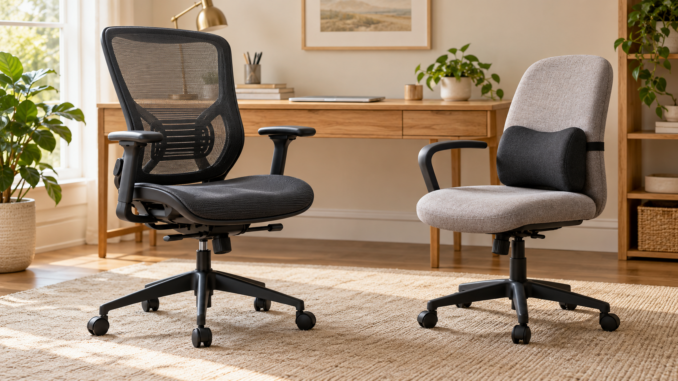
Consider lumbar support when your chair generally fits but leaves your lower back unsupported. Consider a different chair when seat size, height, armrests or basic stability cannot be made to work for you. Neither purchase guarantees pain relief.
Start with a fit check
Sit at your actual desk, in your usual working position. Check your feet, the front edge of the seat, your lower back and your reach to the keyboard. A comfortable showroom chair can feel different under a desk that is too high or too far away.
What lumbar support can change
Lumbar means the lower part of your back. A removable support fills some space between you and the chair. Its thickness and position change where you sit, so adding more padding is not always an improvement.
OSHA’s chair guidance suggests a rolled towel or removable cushion as a temporary option when a chair lacks lower-back support. It also emphasizes a seat that fits, supported feet and armrests that let the shoulders relax.
For a simple trial, compare your usual chair setup with a small amount of added support. Stop if it makes you less comfortable. Notice whether it pushes you so far forward that the rest of the chair no longer supports you.
When a different chair deserves a closer look
A cushion cannot change every part of a chair. If the base is unstable, the chair is damaged or your body falls outside its rated capacity, an add-on is not the answer.
Other reasons to compare a replacement include a seat that is too narrow, a seat edge that crowds the backs of your knees, armrests that block your access to the desk or a height range that does not work with your setup.
An adjustable chair gives you more ways to fit the chair to the task. You still need to understand the controls. Before buying, ask the seller to demonstrate each adjustment and let you try it while reaching toward a desk.
A five-point check before spending money
- Feet. Can you sit with your feet supported? If matching the desk height leaves them dangling, include a footrest in the setup discussion.
- Seat. Is there comfortable room for your hips and thighs? Does the front edge avoid pressing into the backs of your knees?
- Back. Does the support meet your lower back without forcing you into an uncomfortable shape?
- Arms and reach. Can you reach the keyboard and mouse without shrugging or stretching forward? Check whether the armrests get in the way.
- Changes of position. Can you adjust or recline comfortably and get up easily? Plan opportunities to move rather than searching for a pose to hold all day.
Use this as a shopping checklist, not a posture test you can pass or fail. Fit is personal. If discomfort persists or you have symptoms such as numbness or weakness, seek professional assessment rather than continuing to buy cushions.
Think about the whole workday
Write down when the problem shows up. Is it after an hour of typing, during video calls on a laptop or while working from the couch? The answer can help you choose between adjusting the workstation, changing where you work or replacing the chair.
Also consider whether the support must travel between seats. A portable product can be convenient, but you should check it in every seat where you plan to use it. Adding thickness may change your reach and sitting height.
For people balancing desk work with exercise, our guide to finding a starting point in the gym can help with the activity side. If a busy schedule is the challenge, read how to choose a workout split. A chair purchase can address seating comfort; it cannot organize your entire routine.
Two ways to shop at Relax The Back
These products illustrate an add-on support and a complete chair replacement. They are not equivalent purchases, and neither has been hands-on tested for this guide.
Premium Sacro-Ease: compare an add-on support
The Premium Sacro-Ease Back Support was listed at $340. It includes a seat-and-back support structure, so it is more substantial than a small lumbar cushion. Check its dimensions and how much room remains in your current seat.
This is worth comparing if you want a removable support and your chair is otherwise suitable. Test whether it changes your sitting height, leg room or reach. Product claims about pain relief do not establish that it will treat your symptoms. Review Premium Sacro-Ease specifications.
Humanscale Freedom with Headrest: compare a complete chair
The selected black Corde 4 fabric model was listed at $1,551 on sale, compared with a displayed regular price of $1,939. Other upholstery and color choices can change the price. The listed maximum load is 300 pounds.
This is a candidate when you want a full desk-chair replacement and its dimensions, capacity and adjustments fit you. The headrest is only one feature to evaluate; check the seat and desk relationship first. Review Freedom chair specifications.
The store policy excludes sale products from returns. Confirm the exact order’s terms before paying, particularly if you cannot test the chair.
Check the full cost and return rules
Do not treat a return policy as a free home trial. Read the current store policy, plus the product and checkout terms. Ask for written confirmation of eligibility for the exact model, color and sale status. Include delivery, any return shipping and restocking charges in your comparison.
Choose the smallest useful change
Adjust what you own first. Add support if the chair generally fits and a careful trial feels better. Compare replacement chairs when the problem is the chair’s size, condition or adjustment range. Spend more only when you can explain what the extra money changes for your workday.
Frequently asked questions
Can a lumbar cushion make any chair ergonomic?
No. It changes one part of the setup. Seat dimensions, height, armrests, stability and the desk still need to work for you.
Do I need an expensive chair to sit comfortably?
Price alone does not establish fit. Begin with adjustments and compare chairs by dimensions, capacity, usable controls and return terms.
Should I force myself to sit perfectly straight all day?
Aim for a supported setup that allows comfortable changes of position. Do not force a position that worsens symptoms.
What matters most for a tall or larger-bodied shopper?
Check the actual seat dimensions and rated capacity, then test the headrest, armrests and recline. A weight limit alone does not tell you whether the chair will fit.
General workstation education, not a diagnosis or a promise that a seating product will resolve pain.
Enjoy our strength and mobility articles?
Add Steadfast Strength and Mobility as a preferred source on Google to see more of our training advice, educational articles, and practical fitness information.
Or choose Steadfast in Google’s source preferences

Be the first to comment